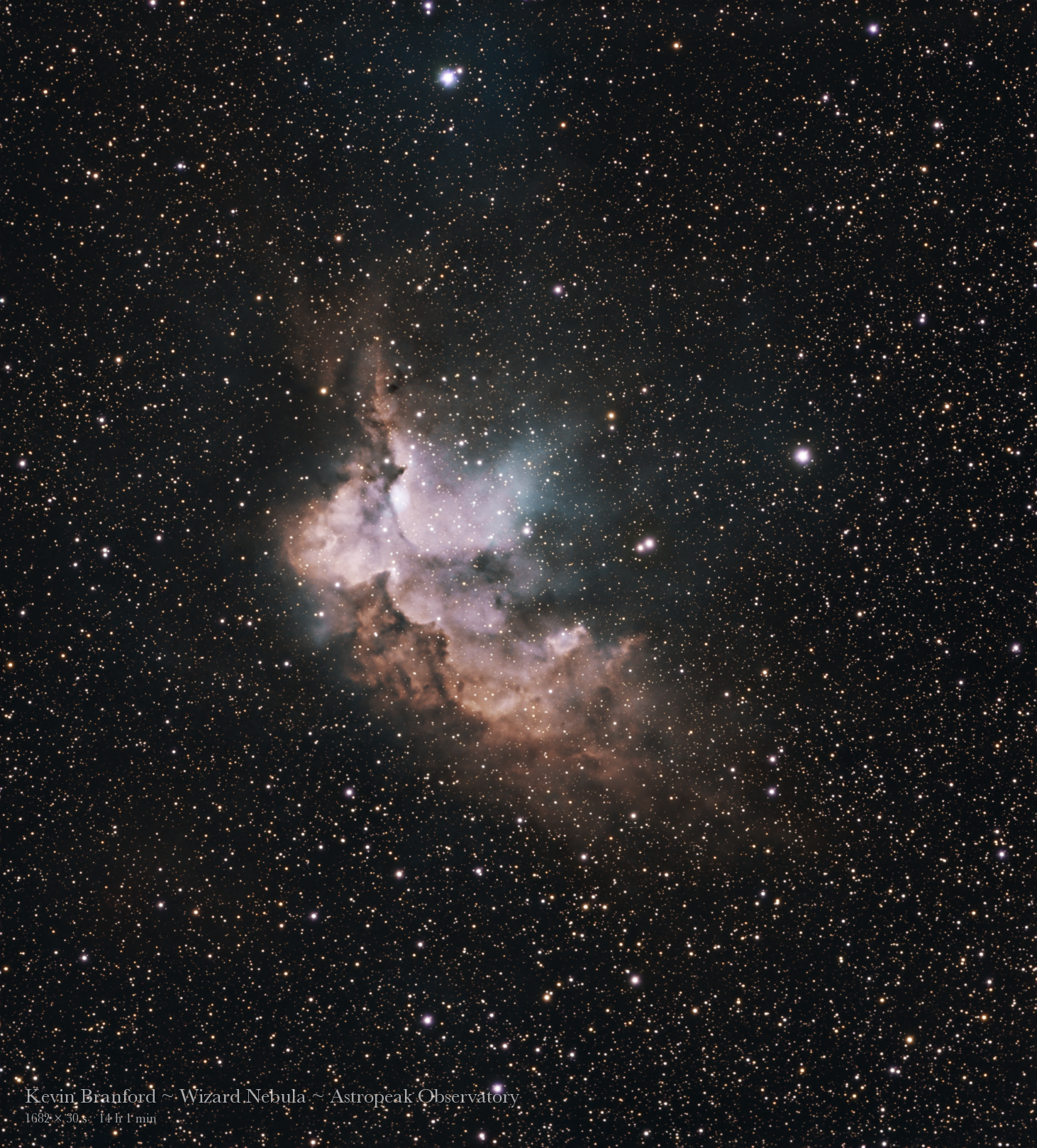
Fourteen hours. 1,682 thirty-second subs off my Seestar S50 Pro at Astro Peak. That's what went into this one — and honestly, the processing was the easy part. It felt only right to run the Wizard Nebula through StackingWizard and AstroWizard, so I figured it was time to write up where these two apps came from, how they actually work, and why they've become the backbone of everything I post here.
Who's Behind the Wizard Apps
Both apps come from Luke Newbould, the astrophotographer and YouTuber better known as Lukomatico. If you've ever watched one of his processing tutorials, you already get the philosophy — his own site says he believes "the magic of astrophotography should be for everyone," and that processing "shouldn't require a second monitor full of documentation." That second line is basically my entire relationship with PixInsight summed up in one sentence.
Here's the part that still surprises people: both apps are completely free. No ads, no tracking, no account to sign up for. Luke funds development through a tip jar, Patreon, and affiliate links to the RC Astro tools (more on those below). They run on Windows 10/11, macOS (Apple Silicon and Intel), and now Linux too. Both are still officially in open beta, and the update pace is wild — AstroWizard's latest build and StackingWizard's Beta 4.7.1 "Moonrise" both landed on October 7, just a couple days after the Beta 4.7 "Vanishing Act" release.
I wrote about AstroWizard back in September when I compared it against Siril and PixInsight. Since then I've added StackingWizard to the front of the workflow, so this is the full pipeline from raw subs to finished photo — all in the Wizard family.
Step One: StackingWizard Does the Heavy Lifting
Before you can edit anything, all those individual subs need to be calibrated, aligned, and combined into one clean master image. That's StackingWizard's job, and its tagline is pretty much the pitch: "stack your subs, simply." You point it at your frames, it walks you through each stage, and you get a stack you can hand straight off to AstroWizard.
A few things that matter for a dataset like this one:
- Trail rejection that doesn't throw out the whole frame. With 1,682 subs over multiple nights, you will catch planes and satellites. StackingWizard detects those trails and leaves out only the trail pixels, instead of tossing the entire sub. On 14 hours of data that adds up to a lot of saved signal.
- Repeatable results. Stack the same night twice and you get identical output — which sounds boring until you're trying to figure out whether a change you made actually helped.
- It speaks observatory file formats. Recent betas added support for NINA's compressed
.fits.fzfiles, two-filter color-camera stacks, drizzled stacks, and correct handling of 16-bit bias frames — the stuff that shows up when your data's coming off a remote pier instead of a Seestar's onboard stacker. - The handoff. When the stack is done, it passes the result along so you're not hunting for output files. Luke's own advice is simple: "Stack first, then bring the result here."
Step Two: AstroWizard Walks You Through the Edit
AstroWizard takes a stacked FITS, TIFF, or XISF file — from StackingWizard, a Seestar, a Dwarf, Siril, DeepSkyStacker, whatever — and breaks processing into nine guided steps, each one with a live preview and an undo button:
- Load your image
- Crop the edges
- Remove the gradient
- Balance the color
- Sharpen
- Reduce noise
- The Big Stretch
- Make it beautiful
- Export & share
Under the hood it's pulling in some serious tools — GraXpert (free) for gradient removal and AI denoising, StarNet2 (free) for star removal, and built-in stretching math based on published PixelMath expressions by Bill Blanshan and Juan Conejero. You don't have to know any of that to use it, though. That's the whole point.
Watch the Whole Edit, Start to Finish 🎬
This is the part I'm most excited to share. Here's the full replay of the Wizard Nebula edit — 21 steps, from the raw stack "As loaded" (basically a flat green-gray field with a faint pink smudge) all the way through color calibration, the starless work, and the final polish with the stars recombined.
Watch the jump between "As loaded" and the color calibration step — that's where the Wizard first shows up as more than a smudge. Then once the stars come off, you can see the nebula getting shaped on its own before they go back in at the very end.
Where the RC Astro Tools Plug In
The free tools inside AstroWizard are genuinely good. But I run it with the three RC Astro machine-learning tools plugged in, and this is where my results took a real jump:
- BlurXTerminator — AI deconvolution. It tightens up stars and pulls fine detail out of the nebula that the stack smeared slightly. In AstroWizard it handles the Sharpen step. ($99.95)
- StarXTerminator — AI star removal. It splits the image into a starless nebula layer and a stars-only layer so you can stretch and color each one separately. ($59.95)
- NoiseXTerminator — AI noise reduction that smooths the background without turning the nebula into plastic. Handles the Reduce Noise step. ($59.95)
The big change is that RC Astro now offers these as stand-alone tools — they don't need PixInsight or Photoshop anymore, and AstroWizard is one of the programs that works with them directly. All three come as a $189.85 bundle, and each one has a free trial, so you can see the difference on your own data before you spend anything. They're the only paid part of this workflow.
The Wizard, Pulled Apart
Here's what StarXTerminator actually hands you. On the left is the starless layer — just the nebula, with all those dark dust lanes and the rust-colored edges finally readable without thousands of stars on top. On the right is the stars-only layer. Look closely at the middle of that one and you can see the open cluster at the heart of the nebula as a sprinkle of bluish stars.


What You're Actually Looking At 🔭
NGC 7380 sits in Cepheus, roughly 7,000+ light-years away, and gets its nickname from the shape — a hunched wizard in a robe with his pointy hat at the top left, leaning over something. Once you see him you can't unsee him. It was discovered by Caroline Herschel back in 1787.
It's a star-forming region wrapped around a young open cluster (also cataloged as NGC 7380). The hot, young stars in that cluster are pumping out the radiation that makes the surrounding hydrogen glow, and they're slowly eating away at the cloud they were born from. Those dark, ragged lanes along the wizard's "robe" are dense dust that hasn't been blown away yet — exactly the kind of detail BlurXTerminator helped bring out.
Why This Workflow Works for Me
I've been honest about this before: PixInsight has a higher ceiling, and if you love the deep technical side of processing, it's worth the time. But I don't want to spend my free time reading documentation — I want to get the shot out to you, onto the site, and onto Instagram while I'm still excited about it.
"StackingWizard, AstroWizard, and the three XTerminators get me good photos without the steep learning curve. For me, that's the whole game."
If you've been sitting on a hard drive full of subs because processing feels like a wall, start here. Download both apps (free), grab the RC Astro trials, and run one dataset through all the way. I think you'll be surprised what's been hiding in your data.
Tools used: StackingWizard + AstroWizard · RC Astro BlurXTerminator, StarXTerminator, NoiseXTerminator
Data: Seestar S50 Pro · 1,682 × 30s (14 hr 1 min) · Astro Peak Observatory, southern Utah
Sources: AstroWizard / StackingWizard (Lukomatico) · RC Astro product pages and pricing (checked Oct 16, 2026)